
Body
Get oriented to UO classroom technology in time for fall term. Instructors are invited to join the classroom tech support team in Information Services for live demos and Q&A sessions about common audiovisual equipment.
Overview of trainings
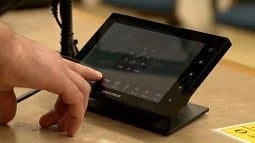
- What: Learn how to do screen sharing and operate AV equipment located at the podium, such as touch panels, document and room cameras, microphones, assistive listening systems, and other technology in classrooms scheduled by the Office of the Registrar (also known as general-pool and joint-controlled classrooms).
- Who: Anyone who teaches or meets in UO classrooms is welcome, including faculty, staff, and students.
- Why: Knowing the basics helps you start class smoothly and avoid tech hiccups. You can get dedicated time with tech experts during a busy time when they might otherwise be occupied.
Group training details
All sessions
- Location: Allen Hall 141.
- Sign up: Registration is encouraged but not required. Registrants will receive slides by email afterward.
Two September tutorials
- Monday, Sept. 21, 9:00–10:30 a.m.
- Thursday, Sept. 24, 2:00–3:30 p.m.
- Each session includes a 45-minute overview and demonstration, followed by drop-in time to ask questions.
October drop-in session
- Friday, Oct. 2, 1:30–3:00 p.m.
- Ask questions and get troubleshooting tips after the first week of classes.
- You can also bring your own equipment and meet with a technician one-on-one.
Individual consultations
- Alternatively, you can request one-on-one trainings in any classrooms scheduled by the Office of the Registrar.
- Submit a ticket at classroom technology support.
Need more help with classroom tech?
- Urgent help during class: Call the team at 541-346-3091.
- One-on-one consultations or other questions: Submit a ticket at classroom technology support.
- More information: Classroom Technology Support website.
Let’s make sure your classroom tech works for you. See you at the trainings!